2025. 4. 18. 00:11ㆍ문제 해결 및 Tip
Current weather and forecast - OpenWeatherMap
OpenWeather Weather forecasts, nowcasts and history in a fast and elegant way
openweathermap.org
API 를 받아와야 하니 사이트에서 회원가입 후 로그인
우측 내정보를 보면 API 를 볼 수 있다.
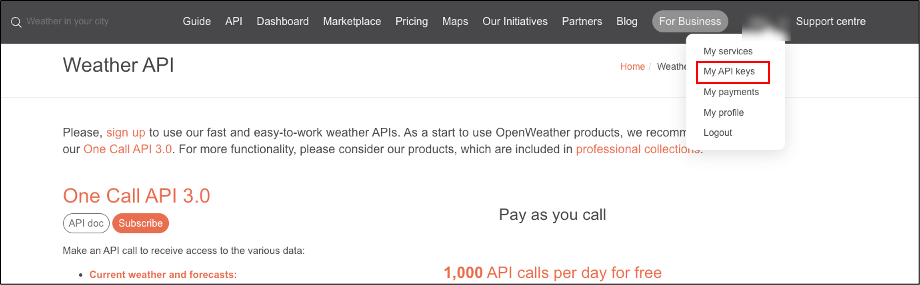
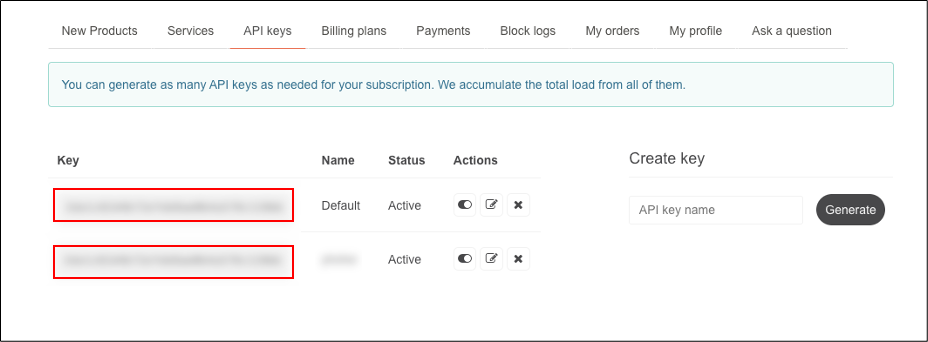
API 키를 복사해서 데이터를 받아올 예정
API 키는 중요 정보로 나중에 github 에 push 할때 같이 들어가지 않게 파일을 따로 관리하여서 .ignore 파일에 넣도록 해야 한다.
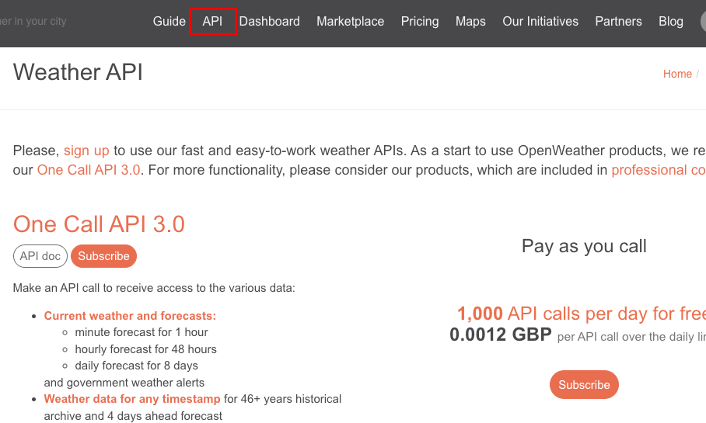
이제 API 로 들어가서
많은 데이터 중에서 5Day / 3 Hour forecast 를 받을 예정 API doc 로 들어간다.
(3시간단위 5일 예보 데이터를 받을 수있다. )

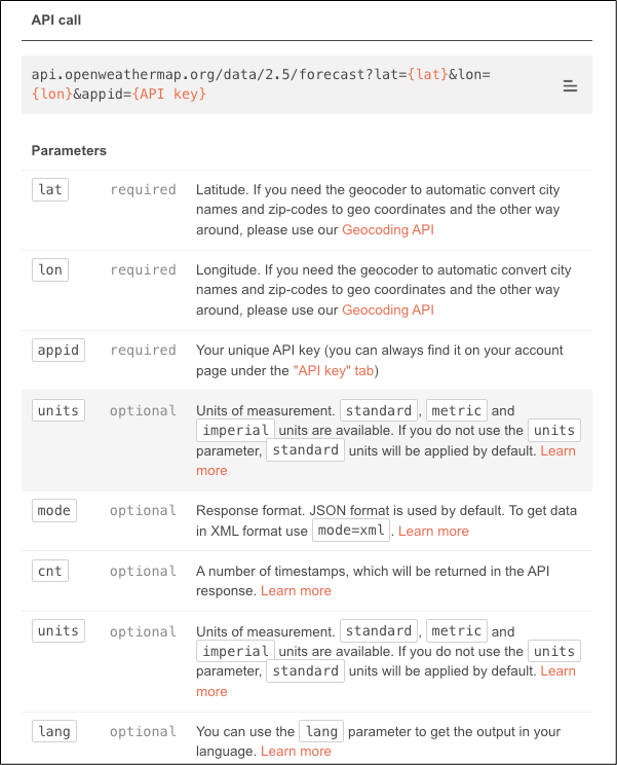
들어가보면 API 호출 방법과 인자를 설명해 놓았다.
API 로 POST 할 url
`https://api.openweathermap.org/data/2.5/forecast?lat=${location.lat}&lon=${location.lon}&appid=${APIKEY}&lang=kr&units=metric`
? 뒤부터 위도 경도 API 키는 무조건 넣어야 하고 그뒤부더 &로 옵션을 적용할 수 있는데 언어와 단위만 작성했다.
App 컴포넌트
import { format } from "date-fns";  // 날짜 포맷해주는 라이브러리 설치 후 import


function App() {
  const [location, setLocation] = useState({ lat:null , lon:null  });
  const [data, setData] = useState([]);


  useEffect(() => {
    navigator.geolocation.getCurrentPosition((success) =>
      setLocation({                    // 위치정보 업데이트
        lat: success.coords.latitude,  // 위도
        lon: success.coords.longitude, // 경도
      })
    );

  }, []);

  useEffect(() => {
    if (location.lat && location.lon) { // 위치정보가 있으면 날씨 API 받아오기
      const url = `https://api.openweathermap.org/data/2.5/forecast?lat=${location.lat}&lon=${location.lon}&appid=${APIKEY}&lang=kr&units=metric`;
      WeatherCall(url, setData); // 날씨 정보 받은것을 setData 로 상태 변경해서 받아옴
    }
  }, [location]);

  // console.log(location);


  const weatherList = data.list;  // data.list 에 3시간단위 5일 치 날씨가 있다.
  return (
    <>
      <GlovalStyle />
      <Divcontainer>
        {data.list &&
          weatherList.map((item, index) => (
            <Weather key={index} weatherli={item} />
          ))}
      </Divcontainer>
    </>
  );
}

export default App;
날씨 불러오기
function WeatherCall(url, setData) {
  fetch(url)
    .then((response) => response.json())
    .then((data) => {
      setData(data);
    });
}

export default WeatherCall;
Weather 컴포넌트
import { format } from "date-fns";

function Weather({ weatherli }) { // App 컴포넌트에서 받아온 Data.list배열 props
  const iconNumber = weatherli.weather[0].icon;  // 데이터 아이콘 넘버를 받아서
  const iconUrl = `https://openweathermap.org/img/wn/${iconNumber}@2x.png`;  //넣어주면 날씨 아이콘 받아옴
  return (
    <WeatherList>
      <li>{format(new Date(weatherli.dt_txt), "MM월 dd일 (eee) HH시")}</li>
      <img src={iconUrl} />                       // 날씨 아이콘이 표시된다.
      <li>{weatherli.weather[0].description}</li>  // 날씨정보
      <li>온도 : {Math.round(weatherli.main.temp)}°C</li>  // 온도 소수점 2자리 반올림 처리
    </WeatherList>
  );
}

export default Weather;
날씨 Icon 목록
https://openweathermap.org/weather-conditions
Weather Conditions - OpenWeatherMap
We use cookies to personalize content and to analyze our traffic. Please decide if you are willing to accept cookies from our website.
openweathermap.org
아래 URL 에서 10d 부분이 아이콘 번호로 이부분으로 바꾸고 크롬에 입력하면 해당 아이콘이 나타난다.
https://openweathermap.org/img/wn/10d@2x.png

위치 받아오기 getCurrentPosition 의 콜백 객체 정보
navigator.geolocation.getCurrentPosition((success) =>
        console.log(success)
      );
<콜솔에 getCurrentPosition 출력되는 정보>
위도, 경도......
{
    "timestamp": 1744899010028,
    "coords": {
        "accuracy": 35,
        "latitude": 11.847433247860366,  // 위도
        "longitude": 118.65029186622166,  // 경도
        "altitude": 0,
        "altitudeAccuracy": null,
        "heading": null,
        "speed": null
    }
}
< 3시간단위 5일치 예보를 받을 수 있다. >

'문제 해결 및 Tip' 카테고리의 다른 글
| 깃허브 action 과 로컬에서 파일명 대/소문자 인식에 따른 오류 (4) | 2025.08.20 |
|---|---|
| Enter 키 이벤트 한글 입력 오류 (1) | 2025.08.20 |
| 무한 스크롤 실행 안됨 ( API 적용 전, mock Data) (2) | 2025.08.18 |
| AWS cloudfront 배포 페이지 새로고침 오류 (0) | 2025.08.18 |
| 모달 창 만들기 (0) | 2025.04.17 |